先搞懂:「Recompiled」和模擬器差在哪First: how a recompilation differs from an emulator
模擬器(例如 Xbox 360 的 Xenia)像同步口譯:遊戲每執行一條機器指令,模擬器當下才去讀懂它、照做一次,一條接一條。
Recompiled 像事先把整本書翻好:在玩之前,就把遊戲的機器碼(Xbox 360 用的是 PowerPC 處理器的指令)翻成 C++ 程式碼,再用電腦自己的編譯器編成一般的程式。玩的時候不用再讀懂指令,直接跑翻好的版本。
但遊戲不只是程式。它還會呼叫主機的系統(開執行緒、讀檔、要記憶體)、叫顯示晶片畫圖、讀 Kinect 看到的身體。這些不是翻譯能處理的,要另外寫一層程式來「扮演」Xbox 360。所以這個專案其實是兩半:翻好的遊戲程式,加上一層代替主機的執行環境(runtime)。
翻譯工具用的是現成的開源專案:CPU 程式用 XenonRecomp,畫面用的著色器(shader,跑在顯示卡上的小程式)用 XenosRecomp。它們原本是為《Sonic Unleashed Recompiled》等專案做的。
An emulator (Xenia, for the Xbox 360) is like a live interpreter: each time the game runs a machine instruction, the emulator reads it and carries it out, one after another.
A recompilation is like translating the whole book in advance: before you play, the game's machine code (the Xbox 360 runs PowerPC instructions) is translated into C++, which your computer's own compiler turns into an ordinary program. While you play, nothing has to be read and understood again.
But a game is more than code. It calls on the console's system (to start threads, read files, get memory), asks the graphics chip to draw, and reads the body the Kinect sees. None of that can be translated; it needs a separate layer that plays the part of the Xbox 360. So this project is two halves: the translated game code, and a runtime that stands in for the console.
The translators are existing open-source projects: XenonRecomp for the CPU code and XenosRecomp for the shaders (the small programs that run on the graphics card). They were made for projects like Sonic Unleashed Recompiled.
README.md專案說明:它是什麼、怎麼安裝What it is and how to install itdocs/progress.md從零開始的實作紀錄(繁中,2026-09-10 起)The build-up from nothing (in Traditional Chinese, from 2026-09-10)config/dependencies.lock.jsonXenonRecomp、XenosRecomp 等工具固定在哪個版本Which versions of XenonRecomp, XenosRecomp and the rest are pinned
9d2ba1c2026-09-22 Free Riders Recompiled
劃清法律界線,再寫第一行程式Draw the legal line before the first line of code
這種專案能公開,前提是不散布任何遊戲本身的東西。這件事會決定之後所有工具怎麼設計,所以一開始就要定好。
- 玩家用自己的光碟:安裝程式(launcher)讀玩家自己的光碟映像檔(ISO),把遊戲資料裝到自己的電腦上。它會先檢查裡面的
default.xex是不是支援的版本(目前只支援美版/歐版光碟),不是就不裝。 - 翻出來的 C++ 永遠只在本機:光碟映像、遊戲檔、從遊戲翻出來的程式碼,全部列在
.gitignore,不進 git、不上傳任何雲端。 - CI(GitHub 上的自動測試)拿不到遊戲:所以 CI 只測不需要遊戲的部分。需要遊戲的建置和測試,都在開發者自己的電腦上跑。
- 發布的安裝包照 Unleashed Recompiled 的模式:開發者用自己的光碟建好程式再發布;遊戲的資料(圖、聲音、影片)一個 byte 都不附。
A project like this can be public only if it ships nothing from the game itself. That decides how every tool is designed, so settle it on day one.
- Players use their own disc: the launcher reads the player's own disc image (ISO) and installs the game's data on their machine. It first checks that the disc's
default.xexis the supported version (only the USA/Europe disc for now), and won't install anything else. - The translated C++ stays local: disc images, game files and the code generated from the game are all in
.gitignore. They never go into git or any cloud service. - CI (the automatic tests on GitHub) never has the game, so it tests only what doesn't need it. Builds and tests that need the game run on the developer's own machine.
- Releases follow the Unleashed Recompiled model: the developer builds the program from their own disc and publishes it; not one byte of the game's data (pictures, sound, movies) goes with it.
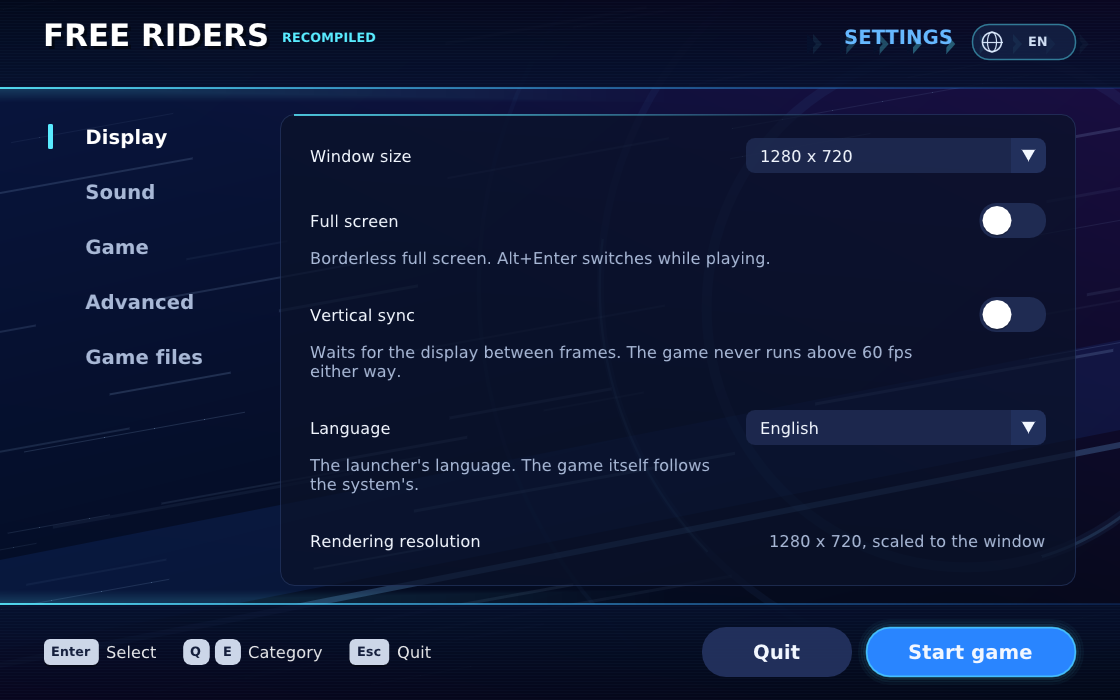
.xex、.cpk、.wmv…)、翻出來的 ppc_recomp.*.cpp,或任何超過 4 MB 的檔案,就直接失敗。How you know: CI has a "No game data" job. It fails if the repo holds a disc image, any of the game's file types (.xex, .cpk, .wmv…), a generated ppc_recomp.*.cpp, or any file over 4 MB..gitignore光碟、遊戲檔、翻出來的程式碼永遠不進 gitDiscs, game files and generated code never go into git.github/workflows/build.ymlCI 的 No game data 檢查CI's No game data jobsrc/installer.cpp安裝前檢查光碟上的 default.xex 是支援的版本The install checks the disc's default.xex is the supported onescripts/prepare_recomp.py翻譯前再用 SHA-256 確認是同一個執行檔Before translating, SHA-256 confirms it's the same programdocs/releasing.md發布包含什麼、絕不包含什麼What a release holds, and what it never holds
28048352026-09-22 Package releases, and carry the shader pack in the APK
把光碟拆開:遊戲到底由什麼組成Take the disc apart: what the game is made of
Xbox 360 光碟用自己的檔案系統(XDVDFS)。拆開之後,這片光碟的遊戲分割區有 685 個檔案。大部分是圖、聲音、影片,真正的程式只有一個:default.xex。
XEX 是加密又壓縮過的執行檔。default.xex 有 14,241,792 bytes,解開後的程式映像是 34,209,792 bytes。裡面記著遊戲要向主機系統借用的 299 個系統函式(例如「開一個執行緒」「讀一個檔」),以及 13 個系統變數。這張清單就是第 4 步「扮演主機」的工作範圍。
An Xbox 360 disc has its own file system (XDVDFS). Taken apart, this disc's game partition holds 685 files. Most are pictures, sound and movies; the actual program is a single file, default.xex.
XEX is an encrypted, compressed program file. default.xex is 14,241,792 bytes, and the decoded program image is 34,209,792 bytes. It lists the 299 system functions the game borrows from the console (like "start a thread" or "read a file") and 13 system variables. That list is the job description for step 04, playing the console.
src/xex_image.cpp解開 XEX:解密、解壓、讀出系統函式清單Decoding the XEX: decrypt, decompress, read the import listconfig/source.json支援版本的雜湊值The supported version's hashesdocs/xex-loader.md執行檔標頭怎麼交給遊戲How the program header is handed to the gamescripts/rom_tool.py讀光碟映像的工具The disc image tool
9d2ba1c2026-09-22 Free Riders Recompiled
翻譯程式:把 PowerPC 翻成 C++Translate the code: PowerPC into C++
XenonRecomp 把程式映像裡的每個函式翻成一段 C++。翻出來的程式不是一次就能用:工具第一次跑完,有 14,475 個函式被標成「翻不出來,先停用」。之後的工作就是一個一個找出原因、把這個數字壓下來。
這個專案的原則跟模擬器不一樣:不認得的東西不猜。翻不了的函式會變成一個有名字的「停止點」,遊戲一跑到那裡就停下來、說出是哪個函式。這樣錯誤會立刻被看見,而不是畫面怪怪的、找不到原因。
XenonRecomp turns each function in the program image into a piece of C++. The output isn't usable in one go: after the first run, 14,475 functions were marked "can't translate, disabled". The work that follows is finding out why, one cause at a time, and bringing that number down.
The rule here differs from an emulator's: never guess at what you don't recognise. A function that can't be translated becomes a named stop; when the game reaches it, it stops and says which function. Mistakes show up at once, instead of as a strange picture nobody can explain.
docs/progress.md 的紀錄。Functions left disabled (fewer is better), from the record in docs/progress.md.三個壓下數字的發現Three findings that brought it down
| 問題Problem | 原因Cause | 結果Result |
|---|---|---|
| 函式被切成碎片Functions cut into fragments | 工具把函式之間的填充(全是 0)和例外處理用的兩個字,當成指令來讀,從此對不上The tool read the padding between functions (all zeros) and two exception-handler words as instructions, and lost its place | 14,475 → 628 |
| 看不懂 switchSwitches not recognised | 現成的分析器只認一種指令順序,這款遊戲的編譯器排成另一種,所以一張「跳轉表」都沒找到;改寫一個不看順序的分析器,找到 309 張The stock analyser expects one instruction order and this game's compiler used another, so it found no jump tables at all; a new analyser that doesn't depend on the order found 309 | 628 → 479 |
| 缺指令Missing instructions | 14 種「讀寫後順便更新位址」和 24 種向量運算,補上有測試的版本,改寫 4,042 處14 load/store-with-update forms and 24 vector operations, added with tests, rewriting 4,042 places | 479 → 143 |
scripts/prepare_recomp.py整條翻譯流程:檢查輸入、跑 XenonRecomp、寫出報告The whole translation run: check the input, run XenonRecomp, write a reportscripts/generate_diagnostic.py把翻好的 C++ 加上檢查與改寫Adds checks and rewrites to the generated C++scripts/analyse_switches.py自己寫的跳轉表分析器Our own jump-table analyserconfig/freeriders.toml給翻譯器的設定(含翻譯時插入的修補點)The translator's settings (including patch points added at translation time)docs/function-boundaries.md函式邊界:為什麼 14,475 大多是假的Function boundaries: why most of the 14,475 weren't realdocs/jump-tables.md跳轉表分析The jump-table analysisdocs/supplemental-instructions.md補上的指令The added instructions
9d2ba1c2026-09-22 Free Riders Recompiled
扮演主機:一個系統函式接一個Play the console: one system function at a time
翻好的遊戲一開始跑,就會向「主機」要東西:要記憶體、開執行緒、等事件、讀檔、問現在幾點、問系統語言是什麼、問 Kinect 在不在。這些都要由我們的執行環境(runtime)回答,而且要回答得跟真的 Xbox 360 一樣。
做法很樸實:跑到哪裡、停在哪裡,就補哪裡。docs/progress.md 從 2026-09-10 開始,記了一長串「現在停在哪個函式、補了什麼、下一個停在哪」。例如遊戲問兩次 Kinect 狀態,就回答「沒有接」,看遊戲自己怎麼處理;它問國家,就去查 Windows 的設定再換成主機的代碼。
遊戲本來在主機的三個 CPU 核心上開了很多條執行緒。在電腦上,每一條都變成一條真的執行緒。要讓它們安全地同時跑,就要把事件、號誌、臨界區(同時只能一個人進去的區段)都做得跟主機一樣。
As soon as the translated game runs, it asks the "console" for things: memory, threads, events to wait on, files, the time, the system language, whether a Kinect is there. Our runtime has to answer all of it, and answer the way a real Xbox 360 would.
The method is plain: run until it stops, fill in what it stopped on. docs/progress.md, from 2026-09-10 on, is a long chain of "it now stops at this function, this was added, next it stops here". For example, the game asks twice whether a Kinect is connected; the runtime says no, and the game's own code handles that. It asks for the country; the runtime reads Windows' setting and turns it into the console's code.
On the console the game spreads many threads across three CPU cores. On a computer each becomes a real thread. For them to run safely at the same time, events, semaphores and critical sections (sections only one thread may be in at once) have to behave exactly as the console's do.
tests/),而且一定要用真的遊戲跑過那一段,才算數。How you know: every system function added has its own unit tests (threads, waits, memory, files, clocks…, see tests/), and it only counts once the real game has run through that part.src/diagnostic_main.cpp遊戲本體:每個系統函式在這裡接到 runtimeThe game itself: where each system function is connected to the runtimesrc/guest_threads.cpp遊戲的執行緒The game's threadssrc/guest_sync_objects.cpp事件、號誌與等待Events, semaphores and waitssrc/guest_memory.cpp遊戲看到的 4 GB 記憶體The 4 GB of memory the game seessrc/guest_files.cpp檔案讀取File readsdocs/reservations.mdlwarx/stwcx. 為什麼要帶版本號Why lwarx/stwcx. needs version numberstests/單元測試The unit tests
畫面:把主機的顯示晶片換成電腦的Graphics: swap the console's GPU for the computer's
Xbox 360 的顯示晶片叫 Xenos。遊戲畫圖時,會把指令和著色器(shader)交給它。在電腦上,這些要換成 Direct3D 12 或 Vulkan(電腦和手機的繪圖介面),著色器也要先翻譯。
遊戲在比賽中用到 1,182 個著色器。一開始有 735 個翻不出來,原因是這款遊戲有兩種用法翻譯器沒料到(骨骼動畫的頂點資料、畫圖時才設定的迴圈次數)。在翻譯前後各補一段處理之後,只剩 3 個。
翻譯著色器的工具只能在 Windows 上跑,所以 Linux 和手機版用的是在 Windows 上事先翻好、打包成 shaders.pack 的版本。另外,顯卡第一次用到一種畫法時要先「編譯」,會卡一下;所以按下開始後,遊戲會先把已知的組合(455 個繪圖管線)準備好,比賽中就不會因為這個停頓。
The Xbox 360's graphics chip is called Xenos. To draw, the game hands it commands and shaders. On a computer those become Direct3D 12 or Vulkan (the drawing interfaces of PCs and phones), and the shaders have to be translated first.
In races the game uses 1,182 shaders. At first 735 couldn't be translated, because this game does two things the translator didn't expect (vertex data for skeletal animation, and loop counts set only when drawing). With a step added before and after translation, 3 were left.
The shader translator only runs on Windows, so Linux and phones use shaders translated ahead of time on Windows and packed into shaders.pack. And because a graphics card has to compile each way of drawing the first time it meets it, which causes a hitch, the game prepares the known combinations (455 graphics pipelines) after you press Play, so races don't stall on it.
docs/shader-vertex-palette.md。Shaders created at run time in races. Numbers from docs/shader-vertex-palette.md.shaders.pack 跟程式不是同一代,著色器以為有 3 個資料位址、程式卻給了 5 個,玩家看到全白的畫面,或顯卡直接當掉。之後 pack 檔頭多了一個「版本號」(shader ABI),版本不合的 pack 在打包和載入時都會被拒絕。A real trap (v0.2.0): the shipped shaders.pack came from a different build than the program. The shaders expected 3 buffer addresses and the program supplied 5; players got a white screen or a lost graphics device. Since then the pack carries a version (the shader ABI), and a pack that doesn't match is refused both when packaging and when loading.src/native_renderer.cpp把遊戲的繪圖指令交給 D3D12/VulkanHands the game's drawing to D3D12/Vulkansrc/native_shaders.cpp遊戲建立著色器時,換成翻好的版本When the game creates a shader, swap in the translated onescripts/pack_shaders.py打包 shaders.packBuilds shaders.packsrc/pipeline_manifest.cpp開始前先準備好的繪圖管線清單The list of pipelines prepared before playdocs/shader-vertex-palette.md735 → 3 的經過How 735 became 3docs/pipeline-preparation.md開始前的管線準備Preparing pipelines before play
沒有 Kinect 也能玩:假裝有一副身體Play without a Kinect: pretend there's a body
這是這款遊戲和一般移植最不一樣的地方:它沒有手把操作。選單用手的游標和語音指令,比賽用整個身體:往前傾加速、蹲下再站起來跳、一隻腳往後踢地加速。
Kinect 在主機上由一套叫 NUI 的函式庫回報「玩家的骨架」:每個人 20 個關節的位置。遊戲自己有大約 25 個「手勢判斷器」(跳、蹲、踢、傾斜…)讀這副骨架。所以最省事、也最不會改壞遊戲的做法,是在 NUI 這一層用手把假裝出一副骨架:
- 選單:手把移動游標當成手;按鍵對應遊戲原本就聽得懂的語音指令(START、A=ok、B=back)。
- 比賽:按住 A 蹲下蓄力、放開跳;按 X 踢地加速;左類比傾斜轉彎、空中旋轉做特技;B 抓欄杆。
This is where this game differs most from other ports: it has no controller controls. Menus use a hand cursor and voice commands; races use your whole body: lean forward to speed up, crouch and stand to jump, kick back with one foot to dash.
On the console a Kinect reports "the player's skeleton" through a library called NUI: 20 joint positions per person. The game has about 25 gesture detectors of its own (jump, crouch, kick, lean…) that read that skeleton. So the simplest way, and the least likely to break the game, is to pretend there's a skeleton at the NUI layer, driven by a controller:
- Menus: the stick moves the cursor as a hand; buttons stand for voice commands the game already understands (START, A = ok, B = back).
- Races: hold A to crouch and charge, release to jump; X to kick dash; the left stick to lean, and to spin for tricks in the air; B to grab rails.
src/nui_skeleton.cpp假的骨架怎麼產生How the pretend skeleton is madesrc/nui_race.cpp比賽中手把怎麼變成身體的動作How a controller becomes body moves in a racesrc/nui_speech.cpp按鍵對應遊戲的語音指令Buttons as the game's voice commandsdocs/main-menu.md第一次用假的 Kinect 進到主選單Reaching the main menu with a pretend Kinectdocs/race-controls.md比賽的按鍵對應Race controls
9d2ba1c2026-09-22 Free Riders Recompiled
真的身體:Webcam、Kinect、Kinect v2,現在加上 MacA real body: webcam, Kinect, Kinect v2, and now the Mac
既然遊戲只在乎「骨架從哪裡來」,換成真的身體就只是換掉上一步那一格:
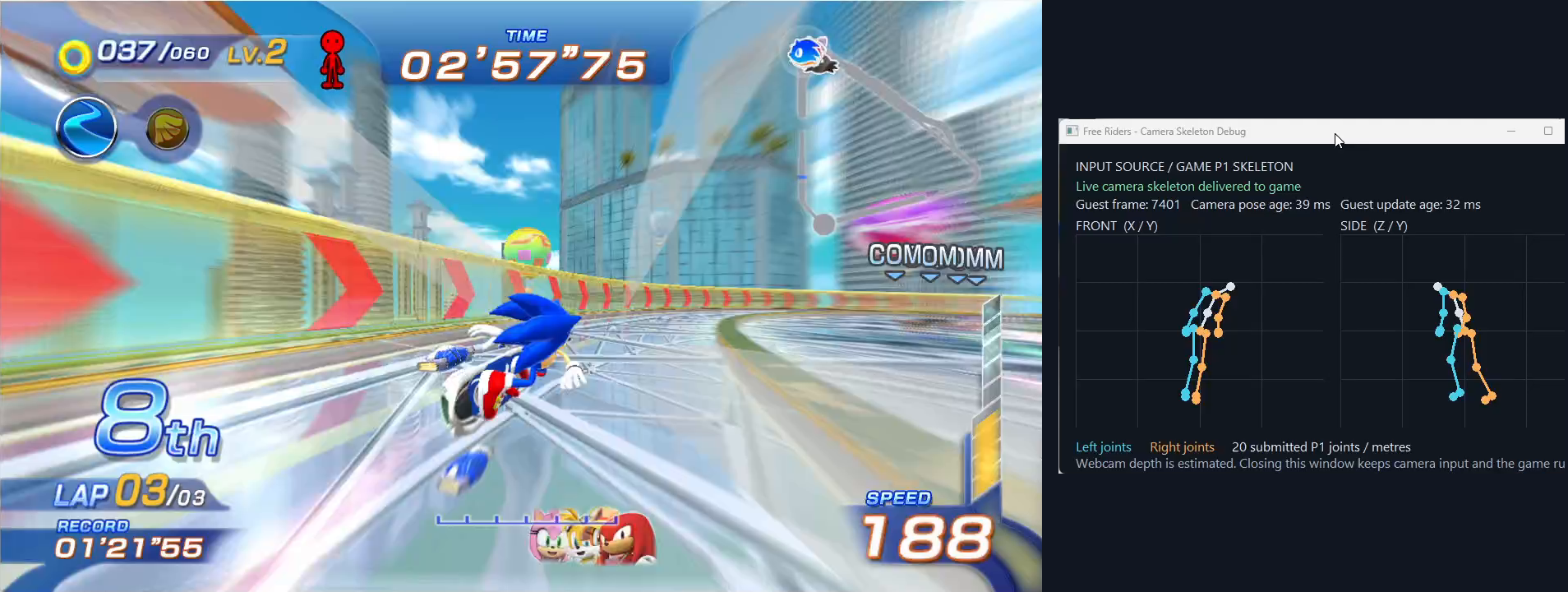
- Webcam(v0.2.0):一般的網路攝影機沒有深度,所以用 MediaPipe 的姿勢模型從畫面「估計」身體的 3D 姿勢。它量不出你離鏡頭多遠,但夠讓遊戲看懂傾身、蹲、跳。
- Kinect for Xbox 360(v0.4.0):微軟給 Windows 的 Kinect SDK 1.8,其實就是同一套 NUI 函式庫搬到電腦上,骨架一樣是 20 個關節、同樣的座標。所以感測器看到的身體幾乎原封不動交給遊戲,比賽也改回由遊戲自己讀真實的身體和深度影像。這部分有很大一部分是協作者 KnucklesLee 做的。
- Kinect v2(Xbox One 版):它回報 25 個關節,要換算成遊戲認得的第一代 20 個關節。專案裡沒有人有 Kinect v2,改進全靠一位玩家附上的記錄檔,所以仍是實驗性的,相關回報還開著(issue #165)。
- Mac(開發中,2026-10-30 合併):Mac 沒有微軟的 Kinect 執行環境,只能透過開源的 libfreenect 拿到彩色和深度畫面,骨架要自己算:用姿勢模型在彩色畫面找關節,再用深度把位置放到公尺座標。老實說:這部分還沒接過真的 Kinect 測試,只確認了沒接 Kinect 時會正常改用手把、整場比賽速度 1.000。
Since the game only cares where the skeleton comes from, a real body just replaces that one box from the last step:
- Webcam (v0.2.0): an ordinary webcam has no depth, so MediaPipe's pose model estimates the body's 3D pose from the picture. It can't measure how far you are from the camera, but it's enough for the game to read leaning, crouching and jumping.
- Kinect for Xbox 360 (v0.4.0): Microsoft's Kinect SDK 1.8 for Windows is the same NUI library brought to the PC: 20 joints, the same coordinates. So the body the sensor sees goes to the game almost untouched, and races go back to the game's own detectors reading the real body and depth image. Much of this was built by collaborator KnucklesLee.
- Kinect v2 (the Xbox One one): it reports 25 joints, which are turned into the first Kinect's 20 that the game knows. Nobody on the project has a Kinect v2; the work relies on logs one player attached, so it's still experimental and the reports about it are open (issue #165).
- Mac (in development, merged 2026-10-30): the Mac has no Microsoft Kinect runtime. The open-source libfreenect gives only the colour and depth pictures, so the skeleton is made here: the pose model finds the joints in the colour picture, and depth places them in metres. To be plain: this hasn't been tried with a real Kinect yet. What has been checked is that without one it falls back to the controller and races at full speed (1.000).
src/camera_player.cppWebcam 的玩家:從畫面到骨架The webcam player: from picture to skeletonsrc/pose_mediapipe.cppMediaPipe 姿勢模型The MediaPipe pose modelsrc/kinect_sensor_win32.cppWindows 上的 Kinect(SDK 1.8)The Kinect on Windows (SDK 1.8)src/kinect_v2_win32.cppWindows 上的 Kinect v2Kinect v2 on Windowssrc/kinect_sensor_freenect.cppMac 上透過 libfreenect 的 Kinect(未用實機驗證)The Kinect on the Mac through libfreenect (not yet tried with real hardware)src/kinect_depth_body.cpp只有彩色和深度畫面時,自己算骨架Making a skeleton from just the colour and depth picturesdocs/kinect-sensor.mdKinect 的設定與原理Kinect setup and how it worksdocs/camera-input.mdWebcam 體感Webcam motion input
打掉重練一半:改用 Unleashed/Marathon 的做法(v0.5.0)Rebuild half of it: the Unleashed/Marathon model (v0.5.0)
到 v0.4.x,遊戲能玩了,但在手機上只有大約 24 fps。原因是早期為了「安全、好除錯」,runtime 做得很保守:每次讀寫記憶體都要檢查、所有執行緒輪流拿同一張「通行證」才能跑、所有畫面都畫在同一張 720p 的畫布上。
2026-10-04 先把這個專案跟另外兩個成熟的 Recompiled 專案(Unleashed、Marathon)逐項對照,列出差異,再分五個階段改過去。每一階段都在同一支手機上、用同一個安裝包開關新功能,交替量 A/B/A/B,確定變快而且畫面正確才往下:
By v0.4.x the game was playable, but only about 24 fps on a phone. Early on the runtime had been built cautiously, for safety and easy debugging: every memory access was checked, all threads took turns holding a single "permit" to run, and everything was drawn on one 720p canvas.
On 2026-10-04 the project was compared, item by item, with two mature recompilations (Unleashed and Marathon), and the differences were moved over in five stages. Each stage was measured on the same phone with the same package, switching the change on and off in turn (A/B/A/B), and only went ahead once it was faster and the picture was right:
docs/architecture-migration.md 和 v0.5.0 的發版說明。AYN Thor handheld, fps over the same stretch of a race (longer is better). From docs/architecture-migration.md and the v0.5.0 release notes.順帶的好處:每個畫面有了自己的畫布之後,遊戲畫的影子第一次出現了,之前影子讀到的是記憶體裡的舊資料。
A bonus: once each surface had its own target, race shadows appeared for the first time. Before, the shadow map read stale bytes from memory.
docs/architecture-migration.md和 Unleashed/Marathon 逐項對照、五個階段與每一步的數字The item-by-item comparison, the five stages and each stage's numberssrc/guest_heap.cpp用 o1heap 取代遊戲自己的記憶體配置o1heap in place of the game's own allocatorsrc/physical_memory.cpp顯示晶片用的記憶體Memory the graphics chip usessrc/native_presentation.cpp每個畫面一張畫布、延後複製One target per surface, deferred copiessrc/race_frame_clock.h比賽每格前進的時間How far a race steps each frame
比原版多一點,但不改壞原版More than the original, without breaking it
移植的價值常在原版做不到的事。這個專案陸續加了:
- 雙人:兩支手把各自是一位 Kinect 玩家(v0.1.5,之後 v0.6.1 讓 Relay Race 也能用手把)。
- 網路對戰:原版的 Xbox LIVE 早就關了。v0.7.0 起,改連這個專案自己的伺服器,Windows、Linux、Android 可以一起比賽;伺服器可以由其中一台玩家的遊戲自己開。
- Mod:讀取 HedgeModManager 格式的替換檔(Unleashed、Marathon 用的同一種),launcher 裡可以開關、排順序。繁體中文化 mod 就是用這個做的。
- 自己的 VRM 模型:遊戲裡的 AVATAR 角色可以換成你自己的 3D 模型,動作仍由遊戲控制。
- 成就(不需要 Xbox Live)、可調的內部解析度、超寬螢幕、觸控與傾斜轉彎。
原則是不偷改遊戲本身的行為。例如手機跑不到 60 fps 時,不是讓比賽每格多走一點(那會改變物理),而是照樣每格固定前進、少畫幾格來追上時間(第 11 步)。
A port earns its keep with things the original can't do. Over time this one added:
- Two players: each controller is a Kinect player of its own (v0.1.5; v0.6.1 made Relay Race work with controllers too).
- Online races: the original Xbox LIVE service closed long ago. From v0.7.0 the game connects to this project's own server instead, and Windows, Linux and Android players race together; one player's game can host the server itself.
- Mods: file-replacement mods in HedgeModManager's format (the one Unleashed and Marathon use), switched on and ordered in the launcher. The Traditional Chinese translation is such a mod.
- Your own VRM model: the in-game AVATAR rider can be your own 3D model, still animated by the game.
- Achievements (no Xbox Live needed), adjustable internal resolution, ultrawide, touch controls and tilt steering.
The rule: don't quietly change how the game itself behaves. When a phone can't reach 60 fps, for example, the race doesn't take bigger steps (that would change the physics); it keeps its fixed step and leaves some frames undrawn to keep up with real time (step 11).
docs/two-players.md雙人Two playersserver/網路對戰的伺服器(也可以用 Docker 跑)The online server (also runs in Docker)src/mod_loader.cpp讀取 modLoading modsdocs/mods.mdMod 的格式與用法Mod format and usedocs/vrm-avatar.md換上自己的 VRM 模型Using your own VRM modeldocs/translation.md遊戲文字在哪裡、怎麼做翻譯 modWhere the game's text is, and how translation mods work
012a9f22026-09-27 2P support6fac24a2026-09-28 Integrate experimental VRM rendering for single-player Avatar482c45f2026-10-06 Load file-replacement mods in HedgeModManager's format, and manage them in the launcherd92ac782026-10-06 Play the title's Xbox LIVE mode on this project's own server (work in progress)
搬到每個平台Bring it to every platform
翻出來的是 C++,所以每個平台用自己的編譯器就能編。但每個平台都有自己的坑,要實際在那裡跑過才算數:
The output is C++, so each platform builds it with its own compiler. Each still has its own traps, and a platform only counts once it has really run there:
| 平台Platform | 在哪裡驗證Verified on | 遇過的真實狀況A real thing that happened |
|---|---|---|
| Windows | 桌機,D3D12 與 Vulkan 都跑整場比賽Desktop; a whole race on both D3D12 and Vulkan | 安裝在有非英文字母的資料夾就開不起來(v0.6.3 修好);Windows 10 需要另附 D3D12 執行檔It wouldn't start from a folder with non-Latin letters (fixed in v0.6.3); Windows 10 needs the D3D12 runtime shipped alongside |
| Linux | WSL 的 Ubuntu 22.04(Vulkan)Ubuntu 22.04 under WSL (Vulkan) | 沒有著色器翻譯器,只能用 Windows 翻好的 pack;pack 裡沒有的東西就畫不出來No shader translator there, so it relies on the pack from Windows; whatever the pack lacks can't be drawn |
| Android | 實體掌機 AYN ThorA real AYN Thor handheld | 兩個 APK(Android 9/10 以上);Mali 顯示晶片的手機開不起來(第 12 步的案例)Two APKs (Android 9 / 10 and later); phones with Mali GPUs wouldn't start (the case in step 12) |
| macOS | Mac mini M1,整場比賽Mac mini M1, whole races | 第一次在 Mac 上跑就找到三個當機;按下 Start 後顯示晶片出錯,要改成只在需要時重新綁定貼圖The first runs on a Mac found three crashes; a GPU fault after Start needed textures rebound only when a stage needs them |
| iOS | 只建置和打包Built and packaged only | 還沒在 iPhone 上實際測過,發版說明照實寫「未測試」Not yet tried on an iPhone; the release notes say "not tested", plainly |
docs/building.md各平台怎麼建置How to build on each platformscripts/build_linux.shLinux 建置The Linux buildscripts/build_android.shAndroid 建置The Android buildandroid/Android 專案The Android projectscripts/package_release.py各平台打包Packaging for each platform
3e21d342026-09-22 macOS: Metal-layer window for MoltenVK, affinity shim; CI checks the buildfb5a7b02026-10-08 Read folders with letters outside the system code page on Windows436bcf62026-10-16 Fix three crashes found running on macOS33b39a02026-10-16 Build and package the game for macOSc0dc0ee2026-10-16 Build and package the game for iOS
跑得更快:先量,再改,再證明Make it faster: measure, change, prove
第一次在電腦上跑完整場 Free Race(2026-09-21)時,只有 1.6 fps,一格要 620 毫秒。先量出時間花在哪裡:遊戲自己的計算只佔 53 毫秒,我們的繪圖部分吃掉九成。一項一項改完之後,同一天就到了大約 60 fps、幾乎跟真實時間一樣快。
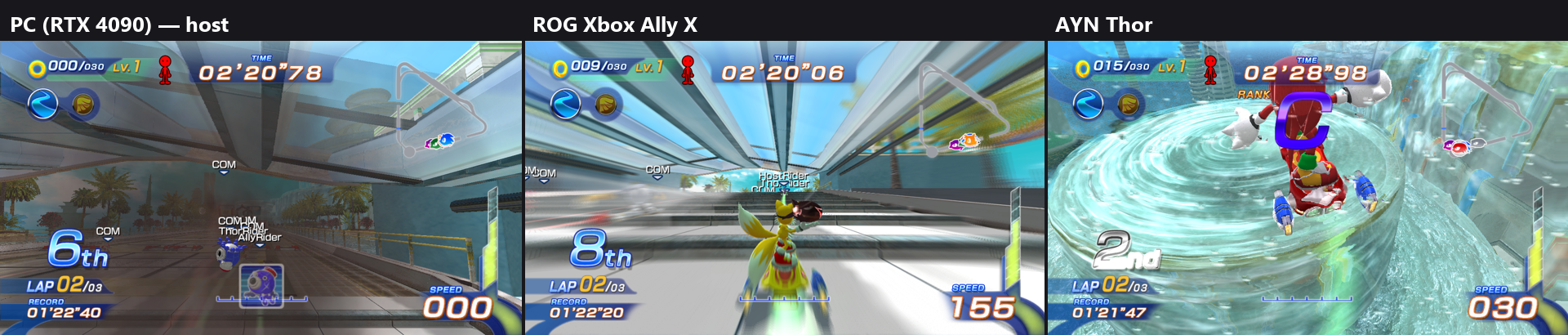
手機是更大的挑戰。每次都用同一套方法:在實體掌機 AYN Thor 上跑同一段比賽,找出最花時間的部分,改它,再交替開關比對(A/B/A/B),確定真的變快、畫面也沒變。
The first whole Free Race on a PC (2026-09-21) ran at 1.6 fps, 620 milliseconds a frame. Measuring where the time went: the game's own work was 53 ms, and our drawing code took nine tenths. After fixing it piece by piece, the same day it reached about 60 fps, close to real time.
Phones were the bigger challenge. The method was the same each time: run the same stretch of a race on a real AYN Thor handheld, find the biggest cost, change it, then switch it on and off in turn (A/B/A/B) to make sure it really got faster and the picture didn't change.
其中一個改法的故事(v0.6.9):Android 把只是在「等」的繪圖執行緒放在唯一一顆最快的核心上,真正決定 fps 的主執行緒反而在較慢的核心。讓繪圖執行緒離開最快的核心之後,起跑線從 52 fps 變成 60 fps。
另一個(v0.9.0):手機跑不到 60 fps 時,原本讓比賽「每格多走一點時間」來保持速度,但這款遊戲的碰撞是照 1/60 秒設計的,步伐一大,跑得快的角色會從坡道側面穿出場外(issue #123)。改成每格固定前進、少畫幾格來追上時間之後,速度和物理都對了。
One change in detail (v0.6.9): Android put the render thread, which mostly waits, on the one fastest core, while the main thread, which sets the frame rate, ran on slower ones. Moving the render thread off the fastest core took the start line from 52 to 60 fps.
Another (v0.9.0): when a phone couldn't reach 60 fps, races used to take longer steps to keep their speed. But this game's collisions are made for 1/60-second steps; with longer steps a fast racer could pass out through the side of a ramp (issue #123). Keeping the fixed step and leaving some frames undrawn to catch up got both the speed and the physics right.
docs/performance.md電腦上的量測:從 1.6 fps 開始Desktop measurements, starting at 1.6 fpsdocs/android-performance.md手機上的量測與「少畫幾格」的做法Phone measurements and the undrawn-frame approachsrc/host_core_plan.h哪條執行緒放在哪顆核心Which thread goes on which coredocs/benchmarking.md怎麼跑可比較的量測How to run comparable measurementsPR 90v0.6.9 的 Thor 52 → 60 fpsThe v0.6.9 Thor change, 52 → 60 fps
接玩家回報:先重現,再修,再用同一招驗證Handle reports: reproduce, fix, verify the same way
這個流程是專案擁有者訂的規則。手機的問題沒辦法每台都買來測,所以會用 Google 的 Firebase Test Lab(雲端上的實體手機),或在電腦上故意套用那種手機的限制來重現。下面是一個完整的真實例子。
This loop is a rule set by the project owner. Nobody can buy every phone, so phone problems are reproduced on Google's Firebase Test Lab (real phones in the cloud), or on a PC with that phone's limits forced on. Here is a complete real case.
案例:「Mali 顯示晶片的手機開不起來」(issue #169)Case: "the game crashes on Mali-based phones" (issue #169)
- 回報(2026-10-17):一位玩家的兩支手機都開不起來:Pixel 10a(Mali-G715)出現載入畫面就關掉,P30 Pro(Mali-G76)連載入畫面都沒有。他附上了兩支手機的診斷檔。
- Pixel 10a 的原因:記錄顯示,顯示卡驅動在編譯第一個繪圖管線時就當掉。著色器裡寫了一個這款晶片自己說不支援的東西(clip distance)。在 Firebase 的 Pixel 10a 上,舊版當得一模一樣;拿掉之後 455 個管線全部編好、畫面正確。v0.10.2 修好。
- P30 Pro 的第一層:它的 Vulkan 少了兩個程式要求的擴充功能。查下去發現其實根本沒用到,就不再要求;後面又接連補上三件舊款 Mali 需要的事。v0.10.3。
- 玩家回報還是不行:管線準備到最後 5 個就整台手機卡住。他附的記錄顯示第一次畫圖時顯示卡就掛了(device lost)。
- 真正的原因:每次畫圖都宣告 20 個頂點輸入,但這代 Mali 最多只支援 16 個。改成只宣告著色器真正用到的(最多 14 個)。在 Firebase 上最接近的舊款 Mali(Galaxy S9,Mali-G72)加一個新測試:455 個管線每個都畫一次。修正打開全部正確,關掉就跟玩家一樣卡死。v0.10.4,同一天發出。
- 玩家確認:P30 Pro 終於進得了遊戲。之後他用新版跑了一場 Magma Rift:畫面 20 fps,但比賽時間跟真實時間一致(0.998),瓶頸在顯示晶片,調低 launcher 的 Render size 最有效。問題關閉,速度另外在 issue #176 追。
- The report (2026-10-17): a player's two phones wouldn't start the game. The Pixel 10a (Mali-G715) closed at the loading screen; the P30 Pro (Mali-G76) didn't even get that far. They attached diagnostics from both.
- The Pixel 10a: the log showed the graphics driver crashing while compiling the first pipeline. The shaders wrote something (a clip distance) this chip itself says it doesn't support. On Firebase's Pixel 10a the old build crashed the same way; without it, all 455 pipelines compiled and frames drew correctly. Fixed in v0.10.2.
- The P30 Pro, first layer: its Vulkan lacked two extensions the renderer required. They turned out to be unused, so they're no longer required; three more things old Mali GPUs need came after. v0.10.3.
- The player said it still failed: preparing pipelines, the whole phone froze on the last 5. Their log showed the GPU lost on the very first draw.
- The real cause: every draw declared 20 vertex inputs, but these Mali GPUs support 16. Now each shader declares only the inputs it reads (14 at most). On Firebase's closest old Mali (a Galaxy S9, Mali-G72), a new test draws once with each of the 455 pipelines: all correct with the fix, and a hang like the player's without it. v0.10.4, the same day.
- The player confirmed: the P30 Pro got into the game. Later they ran a Magma Rift race on a newer build: 20 fps shown, but the race kept real time (0.998); the bottleneck is the GPU, so a lower Render size in the launcher helps most. Closed, with speed followed in issue #176.
issue 169整個過程與玩家的回覆The whole exchange with the playersrc/spirv_clip_distance.hPixel 10a:拿掉 clip distancePixel 10a: leaving out the clip distancesrc/spirv_vertex_inputs.h舊款 Mali:只宣告用到的頂點輸入Old Mali: declaring only the vertex inputs usedsrc/graphics_selftest.cpp每個管線都畫一次的自我測試The self-test that draws with every pipelinePR 182v0.10.4 的修正The v0.10.4 fix
5335c492026-10-18 Compile the vertex shaders without their clip distance on Mali89564942026-10-18 Run Vulkan without scalar block layout and buffer device addresses9d6fcfe2026-10-18 Fall back to a D24S8 depth format where D32S8 is missing28f5c0d2026-10-18 Declare only the vertex inputs a shader reads where a GPU has 16
發版前的檢查清單The release checklist
每個版本都照這張清單走,任何一項沒過就不發(以 0.10.38 為例):
Every release goes through this list; if any item fails, it doesn't ship (0.10.38 as the example):
| 1 | 改版號的 PR,GitHub 上 5 項 CI 全綠(Windows、Linux、macOS、Android、No game data)A version PR with all 5 CI jobs green (Windows, Linux, macOS, Android, No game data) |
| 2 | 單元測試:Windows 183 項、Linux 175 項全過Unit tests: 183 on Windows and 175 on Linux, all passing |
| 3 | Windows 包解壓到乾淨的資料夾,用 Vulkan 加上驗證層跑完整場比賽:沒有任何錯誤,455 個管線全部準備好The Windows package, unpacked into a clean folder, runs a whole race on Vulkan with the validation layer: no errors, all 455 pipelines prepared |
| 4 | Mac(M1)的包跑完整場比賽,速度 1.000The Mac (M1) package runs a whole race at full speed (1.000) |
| 5 | AYN Thor 實機:預設設定、觸控加傾斜、執行緒擠在一顆核心,三種情況都跑比賽並記下速度A real AYN Thor: default settings, touch plus tilt, and threads squeezed onto one core, each racing with its speed recorded |
| 6 | APK 用同一把金鑰簽章,能直接覆蓋安裝舊版APKs signed with the same key, so they install over the previous version |
| 7 | 發版說明寫清楚驗證了什麼,也寫清楚沒測到什麼Release notes that say what was verified, and what wasn't |
| 8 | 發版之後才回覆 issue:先用一般人聽得懂的話說明,再附開發細節Only after the release, reply on the issues: plain words first, developer detail after |
.github/workflows/build.yml5 項 CI 檢查The 5 CI jobsdocs/releasing.md建置、打包、檢查、發布Build, package, check, publishReleases每個版本的說明與驗證結果Every release with its validation
AI 在這裡做了什麼,人做了什麼What AI did here, and what people did
直接說清楚:這個專案大部分的程式碼由 AI 撰寫,主要是 Anthropic 的 Claude,也有一部分是 OpenAI 的 Codex。879 個 commit 裡有 508 個標註 Claude 為共同作者;合併的 235 個 PR 裡,205 個來自 Claude 的分支、18 個來自 Codex 的分支。紀錄都在 git 裡。
「AI 寫的」不等於「垃圾」,也不等於「好」。決定品質的是能不能證明它是對的。這份文件每一步都有「怎麼確認」,那才是重點。
To be plain about it: most of this project's code was written by AI, mainly Anthropic's Claude, with some by OpenAI's Codex. 508 of its 879 commits name Claude as co-author; of the 235 merged PRs, 205 came from Claude's branches and 18 from Codex's. The record is in git for anyone to read.
"Written by AI" doesn't mean "slop", and it doesn't mean "good" either. What decides quality is whether you can prove it's right. Every step on this page has a "how you know"; that is the point.
- 定方向和規則:先重現再修、不准繞過問題、截圖必須是真的、發版說明要寫沒測到什麼
- 擁有光碟、測試用的電腦、Mac 和掌機,實際玩、實際測
- 決定什麼時候合併、什麼時候發版
- 協作者 KnucklesLee:95 個 commit,實體 Kinect 與 Kinect v2 的支援,以及好幾份詳細的效能量測報告
- 玩家回報問題:71 個 issue,65 個來自兩位開發者以外的人,已關閉 52 個
- Set the direction and the rules: reproduce before fixing, no workarounds, real screenshots only, release notes that say what wasn't tested
- Own the disc, the test PCs, the Mac and the handheld; actually play and test
- Decide when to merge and when to release
- Collaborator KnucklesLee: 95 commits, the real Kinect and Kinect v2 support, and several detailed performance reports
- Players report problems: 71 issues, 65 of them from people other than the two developers, 52 closed
- 寫翻譯流程的工具、runtime、繪圖、Kinect 與攝影機、launcher
- 寫測試,並在每次修改後跑完整驗證
- 重現問題、量測、查原因、寫說明文件(docs/ 裡 133 份)
- 照清單建置各平台、在掌機上測試、發版、回覆玩家
- Wrote the translation tooling, the runtime, graphics, Kinect and camera input, and the launcher
- Wrote the tests and ran the full verification after every change
- Reproduced problems, measured, traced causes, wrote the docs (133 in docs/)
- Built every platform from the checklist, tested on the handheld, released, replied to players
不管是誰寫的,你都可以直接檢查:程式碼、每個版本的驗證結果、每個 issue 的處理過程,全部公開在 GitHub 上。
Whoever wrote it, you can check it yourself: the code, each release's validation results and how every issue was handled are all public on GitHub.
Commits每個 commit 與共同作者紀錄Every commit, with its co-author linesIssues每個回報與處理過程Every report and how it was handledPull requests每個修改的 PREvery change as a PR
數字一覽At a glance
| 實作紀錄開始Work log starts | 2026-09-10 |
| 公開 repo 第一個 commit,與第一個能玩的版本(0.1.0)First public commit, and first playable release (0.1.0) | 2026-09-22 |
| 版本數(到 0.10.38)Releases (to 0.10.38) | 86 |
| Commit 數Commits | 879 |
| 合併的 PRMerged PRs | 235 |
| 程式碼(src、tests、scripts、tools、server、android)Code (src, tests, scripts, tools, server, android) | ≈ 137,000 lines |
| 單元測試(0.10.38)Unit tests (0.10.38) | 183 Windows · 175 Linux |
| 遊戲向主機借用的系統函式System functions the game imports | 299 + 13 variables |
| 開始前準備的繪圖管線Pipelines prepared before play | 455 |
| AYN Thor 比賽 fpsAYN Thor race fps | 23–24 → 60 |
| 說明文件Docs | 133 |
目前的程式碼在這裡Where the code is today
上面的連結都固定在 commit eb16749(0.10.38 之後、Mac Kinect 合併時的 main),之後程式碼改了也不會跑掉。最新的程式碼請看:
The links above are pinned to commit eb16749 (main after 0.10.38, when the Mac Kinect work was merged), so they don't drift as the code changes. For the latest code:
YuutaTsubasa/Free-Riders-RecompiledGitHub 上的專案首頁The project on GitHubmain目前的程式碼The current codeeb16749這份文件對照的版本The version this page describesreleases/latest最新版本下載與驗證結果The latest release and its validation